
Explaining the phone's flash signals during a sessionUpdated 5 months ago
During a session, the flash indicator shows you what the system is doing in real time.
Each pattern has a clear meaning. Once you recognize them, you can react faster and avoid setup issues.
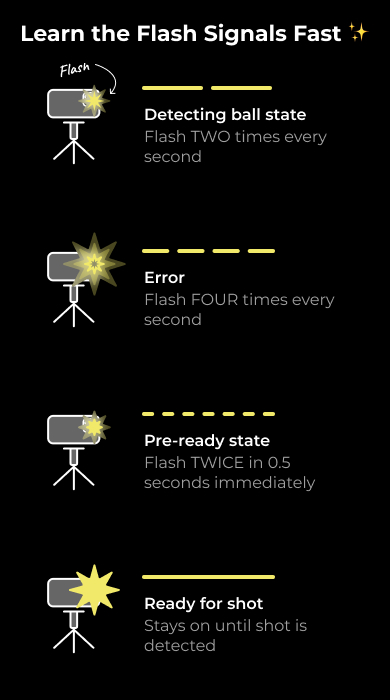
1. Detecting Ball State
- Steady, consistent rhythm
- The system is scanning for the ball position
What you should do:
- Place the ball in view
- Keep things still while it searches
2. Error Signal
- Repeating flash pattern (faster bursts)
- Indicates something needs attention
What it means:
- Ball may be out of position
- Setup may be incorrect
- A specific error message is shown on screen
What you should do:
- Check the on-screen message
- Adjust ball position or setup
- Listen for voice prompts
- If using Apple Watch, check the error there
3. Pre-Ready State (Ball Detected)
- Faster flashing sequence
- Confirms the ball has been found
What you should do:
- Do not move the ball
- Let the system finish calibration
Small movements here can cause misreads.
4. Ready for Shot
- Solid light (no flashing)
- System is fully locked in
What you should do:
- Take your shot
Quick Tip
If you’re stuck in a flashing state:
- Reset your ball position
- Check alignment
- Watch for error messages