
Set the Correct Phone Angle & Tilt for Accurate TrackingUpdated 5 months ago
Your phone angle plays a key role in how shots are tracked.
The app uses your phone’s internal sensors to understand its position and angle. This helps it capture both the ball and its movement through space.
If the angle is off, your shot data can be inaccurate.
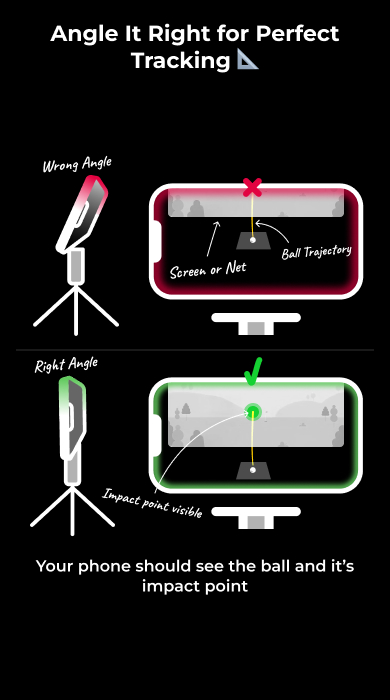
What the Camera Needs to See
- The ball at address
- The initial part of the ball’s flight
- The impact point on the net or screen (indoor mode)
All three should be visible within the frame.
How to Position the Phone
- Place the phone on the ground, angled as close to 90 degrees as possible
- Keep the ball and impact area in view at the same time
- Let the app handle the angle measurement automatically
Keep the Phone Level
- Make sure the phone is horizontally level
- Avoid tilting left or right
Even small tilts can affect:
- Launch direction
- Shot shape
- Accuracy of results
If the Ball Isn’t Detected
Do not adjust the angle first.
Instead:
- Lower the phone closer to the ground
- Recheck that the ball is inside the detection area
Changing height is more reliable than changing angle.
Common Mistakes found when setting the phone's angle and tilt
- Angling the phone too high or too low
- Losing sight of the impact point
- Tilting the phone sideways
- Adjusting the angle instead of the height when detection fails